Overview
Trellis (trellis.law) is a read-only litigation-intelligence provider — state & federal court data and analytics. Through LawLink you can search cases, pull dockets, parties, judges and events, retrieve documents and judicial rulings, manage alerts and webhooks, and query PACER.
Note: Trellis is not a CRM or practice-management platform and does not write data back. It is surfaced through its own dedicated Trellis endpoints (not the universal contacts/matters adapter).
Integration Steps
Connecting Trellis takes two steps: get your API token from Trellis, then paste it into LawLink.
Get your Trellis API token
Trellis access is provisioned by Trellis directly. Request an
API token from your Trellis account team. It is a single,
static, non-expiring token that is sent on every request as an
Authorization: Token <token> header.
🔑 Where it comes from: Your Trellis account team provides the token — there is no self-serve token page. Keep it secret; anyone with the token can query court data against your Trellis quota.
⚠️ Trial tokens are rate-limited. Trial tokens have a daily call limit (for example, ~200 calls per day). See Quotas & Limits.
Connect Trellis in LawLink
In LawLink, open Integrations, find the Trellis plate and click Connect. On the Connect Trellis screen, paste your token into the API Token field and click Connect Trellis.
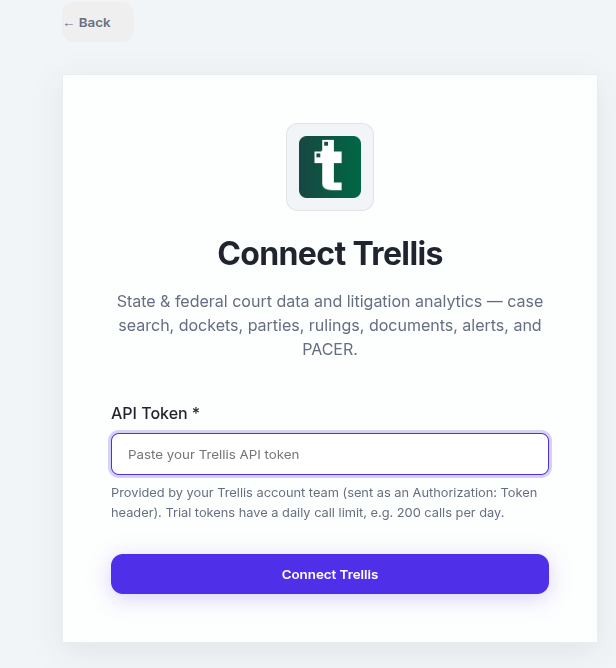
LawLink → Integrations → Connect Trellis → paste your API Token
✅ Validation: LawLink validates the token against Trellis
(GET /v2/status) before saving it. An invalid or
unreachable token is rejected, so a successful connect confirms the token works.
Authentication
Trellis uses a single static API token. After you connect, LawLink stores the token
per user and attaches it automatically to every upstream Trellis call —
you do not pass it on individual requests. All Trellis endpoints live under
https://api.trellis.law/v2.
# Upstream auth header LawLink sends to Trellis
Authorization: Token YOUR_TRELLIS_TOKEN

# Token is validated on connect against:
GET https://api.trellis.law/v2/status
Disconnecting: Remove the connection any time from the Trellis plate (Disconnect). Admins can disconnect Trellis on behalf of another user in their organization from that user's detail page.
What You Can Do
Once connected, these Trellis capabilities are available through LawLink. The examples below are illustrative — the in-app API explorer lists every endpoint with parameters and sample payloads.
Cases (state & federal)
Search dockets, open a case by token or case number, and drill into its sub-resources.
# Search cases
POST /api/v1/trellis/cases/search
{ "query": "acme corp", "state": "ca" }

# Case detail + sub-resources
GET /api/v1/trellis/cases/{token}
GET /api/v1/trellis/cases/{token}/attorneys   # or parties | judge | events | documents
GET /api/v1/trellis/cases/number/{case_number}
Documents
Search court documents and retrieve their content or a download.
POST /api/v1/trellis/documents/search
GET  /api/v1/trellis/documents/{token}/content
GET  /api/v1/trellis/documents/{token}/download
Rulings
Search judicial rulings and open one by token.
# "state" is required — 2-letter, lower-case
POST /api/v1/trellis/rulings/search
{ "state": "ny", "query": "summary judgment" }
GET  /api/v1/trellis/rulings/{token}
Alerts & Webhooks
Track cases with alerts and receive updates via webhooks.
# Alerts
POST   /api/v1/trellis/alerts            # list
GET    /api/v1/trellis/alert/{token}     # track (create)
DELETE /api/v1/trellis/alert/{token}

# Webhooks (CRUD + executions + test)
GET/POST /api/v1/trellis/webhooks
GET    /api/v1/trellis/webhook/{token}/executions
PACER (federal)
Search federal cases and parties through PACER.
POST /api/v1/trellis/pacer/cases/find
POST /api/v1/trellis/pacer/parties/find
GET  /api/v1/trellis/pacer/credentials   # credential status
Note: PACER calls require separate PACER credentials configured in your Trellis account.
Account & Usage
Check how much of your daily Trellis quota remains.
GET /api/v1/trellis/usage
Quotas & Limits
Trellis tokens are quota-limited. Trial tokens are capped (for example, ~200 calls per day) and reset daily. Plan calls accordingly.
⚠️ Best practices:
- Prefer single, targeted calls over broad scans.
- Check remaining quota with
GET /api/v1/trellis/usagebefore heavy use. - Always pass state codes as 2-letter, lower-case (e.g.
ca,ny).
Troubleshooting
Connect fails / "invalid token"
LawLink rejects a token that fails validation against GET /v2/status.
Re-copy the token from your Trellis account team (no surrounding spaces) and try again.
Requests start failing after working
You may have hit your daily quota. Check
GET /api/v1/trellis/usage; quota resets daily, or ask Trellis to raise it.
PACER calls return a credentials error
PACER requires separate credentials configured in Trellis. Confirm status with
GET /api/v1/trellis/pacer/credentials.