Overview
QuickBooks Online brings billing & accounting into LawLink. It plugs into the same Universal API and MCP layers every other integration uses, so an AI assistant or an API client can list a firm's customers, raise invoices, record payments, and pull financial reports through one consistent interface.
👥 Customers
QuickBooks Online Customers, exposed as universal contacts.
listgetcreateupdate🧾 Invoices
Bill a customer for products/services.
listgetcreate💳 Payments
Record money received, optionally against an invoice.
listgetcreate📦 Items
Products/services referenced by invoice lines.
listget📄 Estimates
Quotes that can convert to invoices.
listgetcreate📊 Reports
Profit & Loss and Customer Balance (raw QuickBooks Online report JSON).
read-onlySetup & Connection
QuickBooks connects via OAuth 2.0. The connection is per-user and per-company (Intuit calls the company a realm).
Connect QuickBooks via the UI
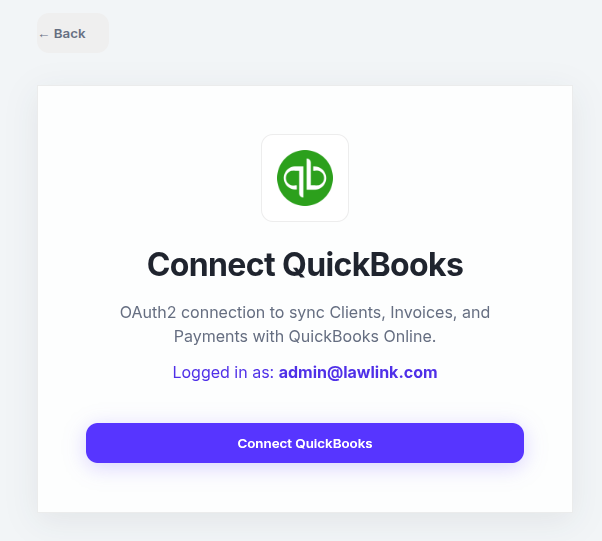
Navigate to Integrations → QuickBooks and click Connect QuickBooks. You'll be sent to Intuit to sign in and pick the company to link. After you approve, Intuit redirects back and the connection is ready immediately.
What happens under the hood
During the callback Intuit returns a realmId (the company ID) alongside the auth code. LawLink stores it with the tokens because every QuickBooks API call is scoped to that company: /v3/company/{realmId}/...
# OAuth endpoints (handled automatically by LawLink)
GET  /api/v1/quickbooks/authorize     # returns the Intuit consent URL
GET  /api/v1/quickbooks/callback      # captures code + realmId, stores tokens
GET  /api/v1/quickbooks/status        # { "connected": true|false }
GET  /api/v1/quickbooks/company-info  # verifies the connection is live
DELETE /api/v1/quickbooks/disconnect  # revokes the token
Token lifecycle
Access tokens live 1 hour and refresh tokens ~100 days. LawLink refreshes access tokens automatically. QuickBooks rotates the refresh token on every refresh, so the new one is persisted each time — nothing for you to manage.
Verify the connection
Confirm LawLink can reach the linked company.
curl.exe -X GET \
  "https://app.lawlink.ai/api/v1/quickbooks/company-info" \
-H "Authorization: Bearer ACCESS_TOKEN"Customers
A QuickBooks Customer is exposed through the universal contacts endpoint. Field mapping:
| Universal field | QuickBooks field |
|---|---|
first_name | GivenName |
last_name | FamilyName |
company | CompanyName |
email | PrimaryEmailAddr.Address |
phone | PrimaryPhone.FreeFormNumber |
| derived from name/company/email | DisplayName (required & unique in QuickBooks Online) |
List Customers
Optionally filter by name with query.
curl.exe -X GET \
  "https://app.lawlink.ai/api/v1/universal/contacts?platform_id=quickbooks&limit=50" \
  -H "Authorization: Bearer ACCESS_TOKEN"
Get a Single Customer
curl.exe -X GET \
  "https://app.lawlink.ai/api/v1/universal/contacts/CUSTOMER_ID?platform_id=quickbooks" \
  -H "Authorization: Bearer ACCESS_TOKEN"
Create a Customer
Provide at least one of first/last name, company, or email so a DisplayName can be derived.
curl.exe -X POST \
  "https://app.lawlink.ai/api/v1/universal/contacts?platform_id=quickbooks" \
  -H "Authorization: Bearer ACCESS_TOKEN" \
  -H "Content-Type: application/json" \
  -d '{
    "first_name": "Jane",
    "last_name": "Doe",
    "email": "jane@example.com",
    "phone": "+1-555-0100"
  }'
Update a Customer
LawLink fetches the current SyncToken and performs a QuickBooks Online sparse update automatically.
curl.exe -X PUT \
  "https://app.lawlink.ai/api/v1/universal/contacts/CUSTOMER_ID?platform_id=quickbooks" \
  -H "Authorization: Bearer ACCESS_TOKEN" \
  -H "Content-Type: application/json" \
-d '{ "email": "new@example.com" }'Invoices
Bill a customer. Provide either explicit line_items or a single convenience amount.
List Invoices
curl.exe -X GET \
  "https://app.lawlink.ai/api/v1/universal/invoices?platform_id=quickbooks&limit=50" \
  -H "Authorization: Bearer ACCESS_TOKEN"
Get a Single Invoice
curl.exe -X GET \
  "https://app.lawlink.ai/api/v1/universal/invoices/INVOICE_ID?platform_id=quickbooks" \
  -H "Authorization: Bearer ACCESS_TOKEN"
Create an Invoice — quick (single amount)
curl.exe -X POST \
  "https://app.lawlink.ai/api/v1/universal/invoices?platform_id=quickbooks" \
  -H "Authorization: Bearer ACCESS_TOKEN" \
  -H "Content-Type: application/json" \
  -d '{
    "customer_id": "58",
    "amount": 750.00,
    "description": "Legal consultation",
    "due_date": "2026-08-01"
  }'
Create an Invoice — itemized
Each line takes an amount, plus optional item_id, quantity, and description.
curl.exe -X POST \
  "https://app.lawlink.ai/api/v1/universal/invoices?platform_id=quickbooks" \
  -H "Authorization: Bearer ACCESS_TOKEN" \
  -H "Content-Type: application/json" \
  -d '{
    "customer_id": "58",
    "line_items": [
      { "amount": 500.00, "item_id": "1", "quantity": 5, "description": "Attorney hours" },
      { "amount": 120.00, "description": "Filing fees" }
    ],
    "due_date": "2026-08-01"
}'Payments
Record money received from a customer. Pass an invoice_id to apply the payment against a specific invoice.
List Payments
curl.exe -X GET \
  "https://app.lawlink.ai/api/v1/universal/payments?platform_id=quickbooks&limit=50" \
  -H "Authorization: Bearer ACCESS_TOKEN"
Get a Single Payment
curl.exe -X GET \
  "https://app.lawlink.ai/api/v1/universal/payments/PAYMENT_ID?platform_id=quickbooks" \
  -H "Authorization: Bearer ACCESS_TOKEN"
Record a Payment (applied to an invoice)
curl.exe -X POST \
  "https://app.lawlink.ai/api/v1/universal/payments?platform_id=quickbooks" \
  -H "Authorization: Bearer ACCESS_TOKEN" \
  -H "Content-Type: application/json" \
  -d '{
    "customer_id": "58",
    "amount": 750.00,
    "invoice_id": "129"
}'Items (read-only)
Items are the products/services referenced by invoice and estimate lines (via item_id). Use these
endpoints to look up the IDs to put on a line.
List Items
Optionally filter by name with query.
curl.exe -X GET \
  "https://app.lawlink.ai/api/v1/universal/items?platform_id=quickbooks&limit=50" \
  -H "Authorization: Bearer ACCESS_TOKEN"
Get a Single Item
curl.exe -X GET \
  "https://app.lawlink.ai/api/v1/universal/items/ITEM_ID?platform_id=quickbooks" \
-H "Authorization: Bearer ACCESS_TOKEN"Estimates
Estimates (quotes) share the exact same line structure as invoices — provide line_items or a single
amount.
List Estimates
curl.exe -X GET \
  "https://app.lawlink.ai/api/v1/universal/estimates?platform_id=quickbooks&limit=50" \
  -H "Authorization: Bearer ACCESS_TOKEN"
Get a Single Estimate
curl.exe -X GET \
  "https://app.lawlink.ai/api/v1/universal/estimates/ESTIMATE_ID?platform_id=quickbooks" \
  -H "Authorization: Bearer ACCESS_TOKEN"
Create an Estimate
curl.exe -X POST \
  "https://app.lawlink.ai/api/v1/universal/estimates?platform_id=quickbooks" \
  -H "Authorization: Bearer ACCESS_TOKEN" \
  -H "Content-Type: application/json" \
  -d '{
    "customer_id": "58",
    "line_items": [
      { "amount": 2000.00, "description": "Retainer estimate" }
    ]
}'Reports (read-only)
Reports return QuickBooks' raw report JSON (rows/columns as QuickBooks Online structures them) — they are passed through unchanged rather than normalized.
Profit & Loss
Optional start_date / end_date (YYYY-MM-DD).
curl.exe -X GET \
  "https://app.lawlink.ai/api/v1/universal/reports/profit-and-loss?platform_id=quickbooks&start_date=2026-01-01&end_date=2026-06-30" \
  -H "Authorization: Bearer ACCESS_TOKEN"
Customer Balance
Outstanding accounts-receivable balance per customer.
curl.exe -X GET \
  "https://app.lawlink.ai/api/v1/universal/reports/customer-balance?platform_id=quickbooks" \
  -H "Authorization: Bearer ACCESS_TOKEN"
🤖 Via the MCP / AI Assistant: Every operation above is also available to the LawLink MCP server. An assistant can, for example, "create a QuickBooks invoice for Jane Doe for $750" or "show this month's profit and loss" — the same Universal endpoints back both doors.